

Description
529andYou: Advanced DNA Segment Analysis Tool
529andYou version 3.3.0.0 is a specialized desktop application designed for genealogists and genetic researchers who rely on DNA data from 23andMe and Ancestry. The software collects and organizes matching segment information from DNA relatives and stores it locally in an SQLite database. This enables users to perform in-depth comparisons between multiple matches, track shared DNA segments, and analyze inheritance patterns across generations. It is particularly useful for those working on complex family tree puzzles, identifying ancestral lines, or validating relationships through segment-level data.
Overview
529andYou serves as a powerful supplement to existing DNA testing platforms like 23andMe and Ancestry. Its primary purpose is to enhance the analysis of shared DNA segments by providing structured storage and advanced comparison tools. The software addresses a key limitation in many genetic genealogy platforms—where segment data is presented but not easily analyzed across multiple relatives. By capturing segment data and enabling triangulation, 529andYou helps users identify which segments are inherited from specific ancestors, reducing uncertainty in relationship predictions.
Target users include amateur and professional genealogists, genetic researchers, and individuals conducting deep ancestry investigations. The software is especially beneficial for those who have tested with 23andMe and are looking to go beyond basic match lists. Real-world usage scenarios include confirming suspected familial connections, identifying shared ancestral lines through triangulated segments, and building detailed inheritance maps for complex family histories.
The developer, 529andYou, has made the core components of this release publicly available under the public domain license, with the exception of the FileSaver.js library, which is licensed under the X11/MIT terms. This open approach encourages transparency and community contributions, aligning with the collaborative nature of genealogical research.
Key Features & Capabilities
- Local SQLite Database Storage – All DNA matching segment data is stored securely on the user’s device, ensuring privacy and offline access. This allows users to maintain full control over their sensitive genetic information.
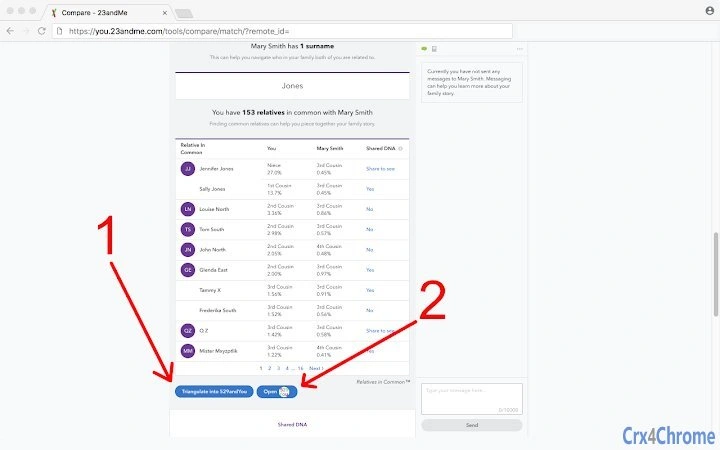
- Triangulation Integration – Users can click a "Triangulate into 529andYou" button to compare themselves and a match against all other relatives with "Yes" in the "Shared DNA" column. Results are saved locally for future review.
- Background Comparison Engine – The "Compare into 529andYou" button allows silent, background processing of multiple relative comparisons, minimizing disruption to workflow.
- CSV and GEFX Export Options – Users can export data in CSV format for use in spreadsheet programs or GEFX format for visualization in Gephi, supporting advanced data analysis and network mapping.
- Phase and Label Tracking – The software includes fields to label inheritance phases (maternal, paternal, both, neither) and add custom labels to matches, enabling detailed annotation of relationship patterns.
- Common Ancestors Field – A dedicated field allows users to record the most recent common ancestors between two individuals, supporting structured genealogical documentation.
- Flexible Display Modes – Users can toggle visibility of advanced fields like phase, label, and common ancestors based on their current workflow needs.
These features collectively support a workflow where users can capture, organize, and analyze segment-level DNA data from multiple relatives. For example, a user might triangulate three matches who share a segment on chromosome 5, label them as “paternal” based on known family history, and later export the data to Gephi to visualize the inheritance network.
User Interface, Workflow & Performance
The user interface is designed to integrate seamlessly with existing DNA comparison pages on 23andMe and Ancestry. Users access 529andYou functionality through clearly labeled buttons—“Triangulate into 529andYou,” “Compare into 529andYou,” and “Open 529andYou”—that appear directly beneath match lists. This contextual placement reduces cognitive load and streamlines the workflow.
Navigating the 529andYou page involves reviewing stored comparisons, applying filters, and managing annotations. The interface supports keyboard shortcuts such as holding Shift to include 23andMe IDs in CSV exports and Alt-clicking to include internal “chromosome 100” tracking data. These enhancements improve efficiency for advanced users.
Performance observations are based on general software behavior patterns. The application operates efficiently within standard desktop environments, with minimal impact on system resources during normal use. The developer did not specify resource usage details, and exact performance metrics were not provided. Stability is expected to be high given the lightweight nature of the software and its use of a local SQLite database.
Compatibility & System Requirements
529andYou version 3.3.0.0 is compatible with Windows, Mac, and Linux operating systems. The installation size is 12.4 MB, indicating a lightweight footprint suitable for most modern desktop systems.
Exact system requirements were not listed. The developer did not provide additional system requirements. Platform compatibility information is limited to the operating systems stated. Users are advised to ensure their system supports the execution of desktop applications and has access to a modern web browser for integration with 23andMe and Ancestry platforms.
Pros and Cons
Pros
- Free to use with no licensing fees
- Local data storage ensures privacy and offline access
- Supports triangulation of DNA segments across multiple matches
- Offers flexible export options including CSV and GEFX formats
- Open-source components under public domain and MIT licenses
- Lightweight installation at just 12.4 MB
- Seamless integration with 23andMe and Ancestry platforms
Cons
- Requires manual data entry or browser integration for initial setup
- Advanced features may have a learning curve for beginners
- No built-in tutorial or onboarding guide provided
- Limited to users with access to 23andMe and Ancestry DNA data
- Dependent on external platforms for raw DNA match data
FAQ Section
Is 529andYou compatible with all DNA testing platforms?
529andYou is designed to work with 23andMe and Ancestry DNA data. It does not support other platforms like MyHeritage or FamilyTreeDNA unless they provide compatible match data through their web interfaces.
Is the software safe to use with sensitive genetic data?
Yes. All DNA data is stored locally in an SQLite database on the user’s device. No data is transmitted to external servers, ensuring privacy and security.
How often does 529andYou receive updates?
Updates are released as needed. The current version is 3.3.0.0, released on March 15, 2024. Users are encouraged to check the official site for the latest version.
What type of license does 529andYou use?
The core components are in the public domain. The FileSaver.js library is licensed under the X11/MIT license. This allows for free use, modification, and distribution.
Can I use 529andYou without an internet connection?
Yes. Once installed and data is imported, the software functions fully offline. However, initial data capture requires access to 23andMe or Ancestry websites.
Final Thoughts + CTA
529andYou stands out as a focused, privacy-first tool for advanced genetic genealogy. Its ability to collect, store, and analyze DNA segment data locally makes it an essential companion for serious researchers. While it requires some technical familiarity, the benefits of triangulation, structured annotation, and export flexibility far outweigh the learning curve for dedicated users.
For genealogists, family historians, and genetic researchers working with 23andMe and Ancestry data, 529andYou offers a powerful, free solution to deepen their analysis. Its open licensing and lightweight design make it accessible and trustworthy.
Download 529andYou now
Guides & Tutorials for 529andYou Extension for Chrome
How to install 529andYou Extension for Chrome
- Click the Preview / Download button above.
- Once redirected, accept the terms and click Install.
- Wait for the 529andYou Extension for Chrome download to finish on your device.
How to use 529andYou Extension for Chrome
This software is primarily used for its core features described above. Open the app after installation to explore its capabilities.
User Reviews for 529andYou Extension for Chrome 0
No reviews found





